
















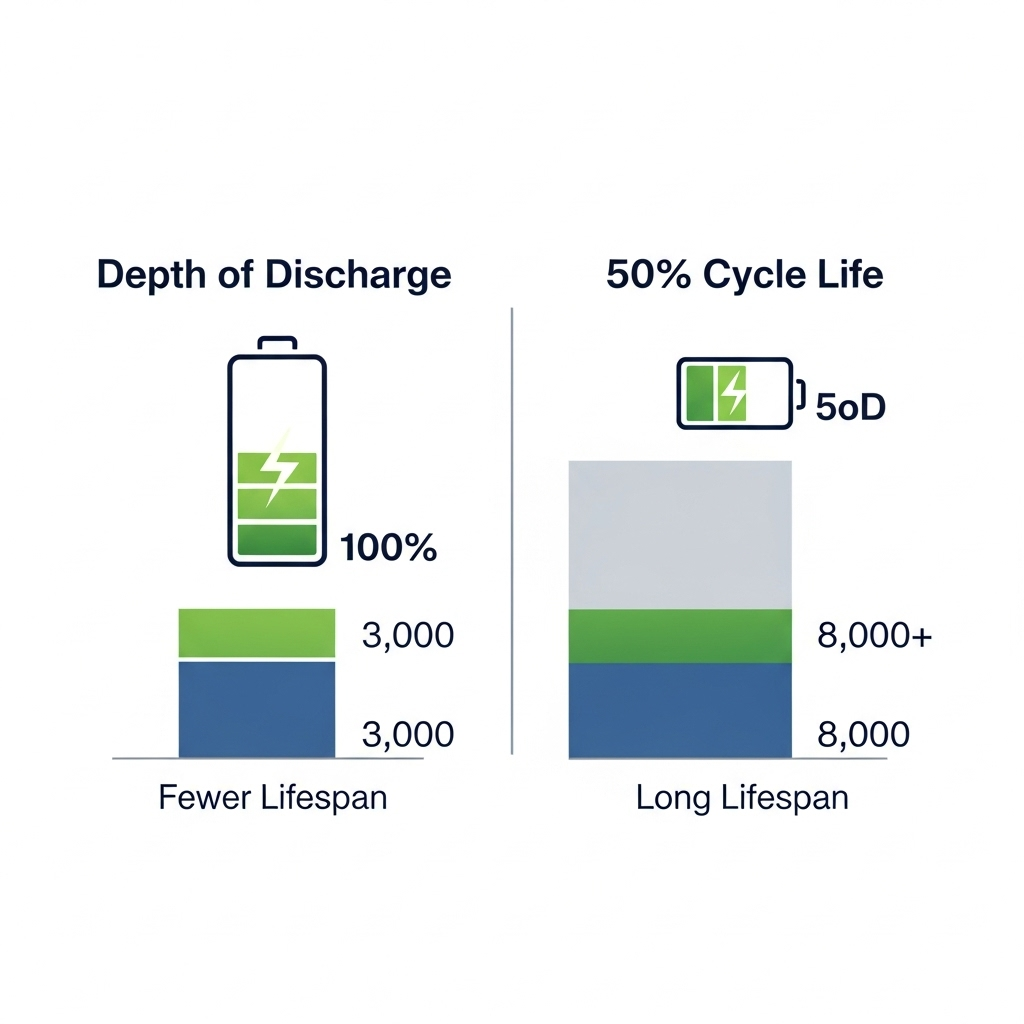
Your home battery is a significant investment in your energy independence. Like any high-performance equipment, its lifespan is not just a matter of time, but of how you use it. One of the most critical factors you control is the daily State of Charge (SOC) window. This setting dictates how much energy you use each day and directly influences how many years your battery will perform optimally. This guide uses data to explain the relationship between your SOC window and battery cycle life, empowering you to make informed decisions for your system.
Disclaimer: The information in this guide is for educational purposes only. Battery settings involve significant financial and safety considerations. Always consult your official manufacturer's documentation and a certified installation professional before making any changes to your home energy storage system.
Understanding the Core Concepts: SOC and Cycle Life
Before adjusting settings, it's important to grasp the two key terms that define your battery's daily operation and overall longevity.
What is State of Charge (SOC)?
Think of State of Charge as the fuel gauge for your battery. It's expressed as a percentage, where 100% means the battery is fully charged and 0% means it is fully discharged. The 'SOC window' is the operating range you define for daily use. For example, you might set your battery to charge up to 90% and discharge down to 20%. This 70% range is your daily SOC window, and managing it wisely is the key to a long-lasting battery.
Defining Battery Cycle Life
A 'cycle' refers to one full charge and discharge of the battery. The 'cycle life' is the total number of full cycles a battery can undergo before its capacity degrades to a specific level, typically 80% of its original rating. However, cycle life is not a fixed number. It is highly dependent on operating conditions. As highlighted in the Electricity Storage Valuation Framework by IRENA, cycle life is a critical parameter for evaluating the long-term value and viability of different energy storage technologies.
The Direct Impact of SOC Window on Battery Longevity
The size of your daily SOC window has a direct, measurable effect on your battery's health. Consistently pushing your battery to its absolute limits accelerates wear, while operating within a more moderate range can significantly extend its lifespan.
The Science Behind Battery Stress
Lithium-ion batteries, including the stable Lithium Iron Phosphate (LiFePO4) chemistry, experience stress when held at very high or very low states of charge. Charging to 100% or discharging to 0% causes more strain on internal components like the anode and cathode. The International Energy Agency's Energy Technology Perspectives 2024 report underscores that the properties of the anode are fundamental to a battery's performance, safety, and cycle life. By avoiding these extremes in daily use, you reduce the rate of chemical degradation and preserve the battery's capacity for longer.
Shallow vs. Deep Discharges: A Data-Driven Comparison
The term Depth of Discharge (DoD) is the inverse of your SOC window. If you use 80% of your battery's capacity, your DoD is 80%. A shallower discharge (smaller DoD) leads to a much longer cycle life. While manufacturers' specifications vary, the relationship is consistent across LiFePO4 batteries.
| Depth of Discharge (DoD) | Estimated Cycle Life |
|---|---|
| 100% | ~3,000 cycles |
| 80% | ~4,500 cycles |
| 60% | ~7,000 cycles |
| 50% | ~8,500+ cycles |
Note: These cycle life figures are industry estimates for LiFePO4 batteries under controlled laboratory conditions (e.g., ~25°C / 77°F, 0.5C charge/discharge rate, and cycle life ending when capacity drops to 80%). Actual performance will vary based on your specific model, usage patterns, and environmental conditions. Always refer to your manufacturer's warranty and technical datasheets for authoritative figures.
As the table shows, reducing your daily DoD from 100% to 80% can increase cycle life by about 50%. Halving your daily DoD to 50% could nearly triple the battery's lifespan. This presents a clear trade-off: accessing less energy each day can dramatically increase the total energy your battery will deliver over its lifetime.
Practical Strategies for Setting Your SOC Window
There is no single 'best' SOC window; the ideal setting depends on your priorities. Here are three common strategies you can adapt to your needs.
Strategy 1: The Conservative Approach for Maximum Longevity
This strategy involves using a narrow SOC window, for instance, setting a maximum charge of 85% and a minimum discharge of 25%. This 60% window is gentle on the battery. It is best for users who have an oversized battery system relative to their daily needs or whose primary goal is to maximize the lifespan of their investment. The long-term financial benefit comes from delaying the need for a costly battery replacement.
Strategy 2: The Balanced Approach for Everyday Use
A balanced strategy might use a wider window, such as 95% down to 15%. This 80% DoD provides ample energy for daily needs, including running household appliances and capitalizing on Time-of-Use (ToU) rate arbitrage, while still avoiding the most stressful extremes. This is a popular and effective middle-ground for most home energy storage users.
Strategy 3: The Backup Power Priority
If your main concern is having power during an outage, you should set a high minimum SOC. For example, you could set your SOC window from 90% down to 40%. This allows you to cycle the top 50% of your battery for daily savings while always keeping a substantial 40% reserve. This approach ensures your home remains powered during grid failures without keeping the battery at a stressful 100% charge all the time.
How to Calculate Your Ideal SOC Window: A Simple Template
To move from general strategies to specific numbers, you can use this simple template to tailor your SOC window to your actual consumption and backup needs.
Step 1: Determine Your Daily Energy Use.
Check your monitoring app to find your average daily energy consumption in kWh. Let's say your household uses 12 kWh per day.
Step 2: Decide on Your Backup Reserve.
How much energy do you want to reserve for a power outage? If you want to keep 40% of your battery for emergencies, this is your minimum SOC.
Step 3: Calculate Your SOC Window.
- Battery Capacity: Assume you have a 15 kWh battery.
- Daily Energy Needed from Battery: 12 kWh.
- Daily DoD Required: (12 kWh / 15 kWh) = 80% DoD.
- Set Your Window: To achieve an 80% DoD, you could set your window from 95% down to 15%. This provides 12 kWh of usable energy while avoiding the most stressful charge levels. If your daily need was only 9 kWh (a 60% DoD), you could use a more conservative 85% to 25% window to maximize lifespan.
Integrating SOC with Other Performance Metrics
The SOC window is a powerful tool, but its effectiveness is amplified when considered alongside other operational factors like C-rate and temperature.
Pairing SOC with C-Rates
C-rate measures how fast a battery charges or discharges relative to its capacity. High C-rates (fast charging/discharging) are more stressful at the upper and lower ends of the SOC spectrum. For optimal health, it's wise to use slower C-rates when charging above 90% or discharging below 20%. Within a moderate daily SOC window, the battery can more easily handle higher C-rates.
Leveraging Data for Smart Decisions
Understanding the interplay of these factors is crucial for optimization. For a detailed analysis of how different metrics affect battery performance, industry resources like the Ultimate Reference for Solar Storage Performance from commercial suppliers can offer valuable benchmarks. Their data confirms that a LiFePO4 battery operating at an 80% DoD can reliably achieve over 4,000 cycles. By reducing that DoD to 50%, the cycle life could be extended beyond 8,000 cycles. This data powerfully illustrates the direct financial and operational benefits of managing your SOC window effectively.
Looking Ahead: The Future of Battery Management
As technology advances, battery management is becoming more sophisticated. Smart systems can now use AI to automatically adjust SOC windows based on weather forecasts, your electricity consumption patterns, and dynamic utility rates. This removes the guesswork and ensures your battery is always operating at peak efficiency and health. Furthermore, the industry is making strides in sustainability. As noted in the IEA's report, The Role of Critical Minerals in Clean Energy Transitions, establishing robust frameworks for second-life battery applications and recycling is essential for a clean energy future. By properly managing your battery's first life, you contribute to a more sustainable energy ecosystem.
Frequently Asked Questions
What is the ideal SOC window for a LiFePO4 home battery?
There is no single ideal window, but a balanced approach is often best. An SOC window between 15% and 95% (80% DoD) offers a great mix of daily usable energy and long-term battery health. For those prioritizing longevity, a window between 25% and 85% (60% DoD) is an excellent choice.
Is it bad to charge my home battery to 100%?
Occasional charging to 100% is not harmful, especially for battery calibration. However, keeping a lithium-ion battery at 100% SOC for extended periods, particularly in high temperatures, accelerates degradation. For daily use, it's better to set the maximum charge to 90-95%.
How much does a narrower SOC window reduce my usable capacity?
It's a direct relationship. If you have a 10 kWh battery and use a 90%-10% SOC window (80% DoD), you have 8 kWh of usable energy. If you switch to a more conservative 85%-25% window (60% DoD), your usable energy becomes 6 kWh. You trade 2 kWh of daily capacity for a significant increase in overall cycle life.
Does the SOC window matter for backup-only batteries?
Yes. A battery intended purely for backup should not be kept at 100% indefinitely. The ideal state for long-term storage with minimal degradation is typically between 50% and 80% SOC. Some systems allow you to set a 'storage' or 'backup' mode that holds the charge in this optimal range, only charging to full when a storm or potential outage is detected.
Can I change my SOC window settings?
Absolutely. Most modern battery storage systems allow you to easily adjust the minimum and maximum SOC settings through a mobile app or web portal. You can and should adjust these settings based on your changing needs, such as seasonal variations in solar production or preparing for an incoming storm.
